
Certificate Management
#Certificates in Chroot
Gluu Server components have cryptographic keys and X.509 certificates that are stored inside thechroot. Details for certificates associated with each component are provided below. The following certificates are available in the /etc/certs folder.
| IDP | Shibboleth | APACHE | OPENDJ |
|---|---|---|---|
| idp-encryption.crt | shibIDP.crt | httpd.crt | opendj.crt |
| idp-encryption.csr | shibIDP.csr | https.csr | opendj.pksc12 |
| idp-encryption.key | shibIDP.jks | httpd.key | |
| idp-encryption.key.orig | shibIDP.key | httpd.key.orig | |
| idp-signing.crt | shibIDP.key.orig | ||
| idp-signing.csr | shibIDP.pkcs12 | ||
| idp-signing.key | |||
| idp-signing.key.orig |
The certificates for Passport authentication are passport-rp.jks, passport-rp.pem, passport-rs.jks.
The SCIM certificate is named scim-rs.jks and the OTP certificate is named otp_configuration.json.
#Custom Script JSON Files
Additionally the following json files are available which are used in different custom scripts for multi-factor authentication.
cert_creds.jsonduo_creds.jsongplus_client_secrets.jsonotp_configuration.jsonoxauth-keys.jsonsuper_gluu_creds.jsonvericloud_gluu_creds.json
#Generating Cryptographic Keys
The Gluu Server is compatible with the Java KeyGenerator to create new cryptographic keys if needed.
To get KeyGenerator, run the following command inside the chroot:
wget https://ox.gluu.org/maven/org.gluu/oxauth-client/4.2/oxauth-client-4.2-jar-with-dependencies.jar -O oxauth-client.jarThen, run KeyGenerator with the following command:
java -jar oxauth-client.jar <arguments>The Gluu implementation of KeyGenerator accepts the following arguments:
| Argument | Description |
|---|---|
-at <arg> | oxEleven Access Token |
-dnname <arg> | DN of certificate issuer |
-enc_keys <arg> | Encryption keys to generate (For example: RSA_OAEP, RSA1_5) |
-expiration <arg> | Expiration in days |
-expiration_hours <arg> | Expiration in hours |
| -h | Show help |
-keypasswd <arg> | Key Store password |
-keystore <arg> | Key Store file (such as /etc/certs/api-rs.jks) |
-ox11 <arg> | oxEleven Generate Key Endpoint. |
-sig_keys <arg> | Signature keys to generate. (For example: RS256 RS384 RS512 ES256 ES384 ES512 PS256 PS384 PS512) |
#Certificates in oxTrust
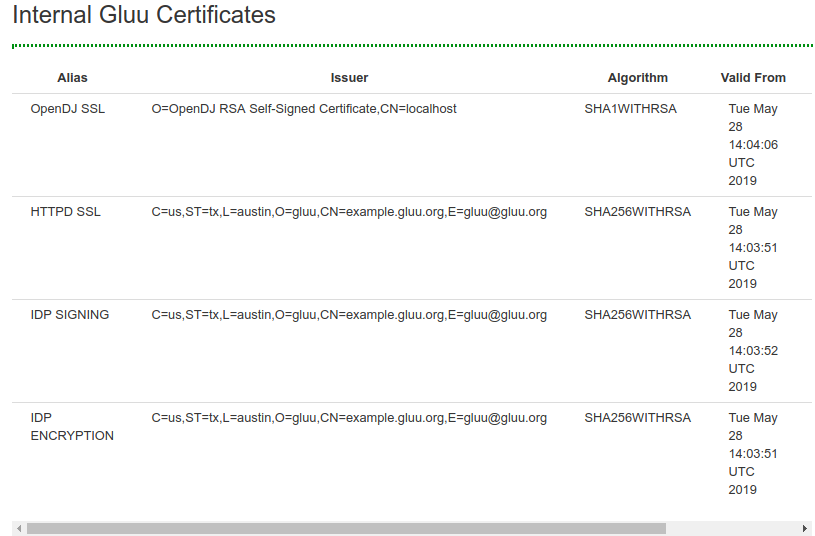
Certificates commonly used for SSO typically have a short expiration date, and can now be easily viewed and downloaded in oxTrust. Navigate to Configuration > Certificates to access these certificates.
The following are available:
- OpenDJ SSL
- httpd SSL
- IDP Signing
- IDP Encryption
#Updating Apache Certificate
The certificates must be manually updated from the /etc/certs/ folder.
There are many tools that can be used to update and renew certificates. By default Gluu uses OpenSSL. If you have questions about using other tools, like Let'sEncrypt, check the Gluu support portal for existing threads. If there is no existing information, sign up and open a ticket.
Please follow these steps shown below to update the Apache SSL cert:
- Save the latest SSL httpd key and certificate in the
/etc/certsfolder - Rename them to
httpd.keyandhttpd.crtrespectively - Import 'httpd.der' into the Java Keystore
/ Convertion to DER, command:
openssl x509 -outform der -in httpd.crt -out httpd.der- Delete the existing certificate to avoid ambiguity due to presence of 2 different certificates for the same entity after importing the new one:
/opt/amazon-corretto-x.x.x.x-linux-x64/bin/keytool -delete -alias <hostname_of_your_Gluu_Server>_httpd -keystore /opt/amazon-corretto-x.x.x.x/lib/security/cacerts -storepass changeit - Import certificate into the Java Keystore(cacerts):
/opt/amazon-corretto-x.x.x.x/bin/keytool -importcert -file httpd.der -keystore /opt/amazon-corretto-x.x.x.x/lib/security/cacerts -alias <hostname_of_your_Gluu_Server>_httpd -storepass changeit
- Delete the existing certificate to avoid ambiguity due to presence of 2 different certificates for the same entity after importing the new one:
- Restart
opendj,apache2/httpd,oxauthandidentityservices.
#Install Intermediate Certificates
Please follow the steps below to install intermediate certificates:
- Log in to the Gluu Server container.
- Keep your intermediate certificate in the file
/etc/certs/. - Modify
/etc/httpd/conf.d/https_gluu.conf, and addSSLCertificateChainFile /etc/certs/name_of_your_interm_root_cert.crt. - Restart the
httpdservice.
#Rotating Certificates and Keys in Kubernetes setup
| Associated certificates and keys |
|---|
| /etc/certs/gluu_https.crt |
| /etc/certs/gluu_https.key |
Create a file named
web-key-rotation.yamlwith the following contents :# License terms and conditions for Gluu Cloud Native Edition: # https://www.apache.org/licenses/LICENSE-2.0 apiVersion: batch/v1 kind: Job metadata: name: web-key-rotation spec: template: metadata: annotations: sidecar.istio.io/inject: "false" spec: restartPolicy: Never containers: - name: web-key-rotation image: gluufederation/certmanager:4.4.0-1 envFrom: - configMapRef: name: gluu-config-cm # This may be differnet in Helm args: ["patch", "web", "--opts", "valid-to:365"]Apply job
kubectl apply -f web-key-rotation.yaml -n <gluu-namespace>
Create a secret with
gluu_https.crtandgluu_https.key. Note that this may already exist in your deployment.kubectl create secret generic web-cert-key --from-file=gluu_https.crt --from-file=gluu_https.key -n <gluu-namespace>`Create a file named
load-web-key-rotation.yamlwith the following contents :# License terms and conditions for Gluu Cloud Native Edition: # https://www.apache.org/licenses/LICENSE-2.0 apiVersion: batch/v1 kind: Job metadata: name: load-web-key-rotation spec: template: metadata: annotations: sidecar.istio.io/inject: "false" spec: restartPolicy: Never volumes: - name: web-cert secret: secretName: web-cert-key items: - key: gluu_https.crt path: gluu_https.crt - name: web-key secret: secretName: web-cert-key items: - key: gluu_https.key path: gluu_https.key containers: - name: load-web-key-rotation image: gluufederation/certmanager:4.4.0-1 envFrom: - configMapRef: name: gluu-config-cm #This may be differnet in Helm volumeMounts: - name: web-cert mountPath: /etc/certs/gluu_https.crt subPath: gluu_https.crt - name: web-key mountPath: /etc/certs/gluu_https.key subPath: gluu_https.key args: ["patch", "web", "--opts", "source:from-files"]Apply job
kubectl apply -f load-web-key-rotation.yaml -n <gluu-namespace>
| Associated certificates and keys |
|---|
| /etc/certs/oxauth-keys.json |
| /etc/certs/oxauth-keys.jks |
Create a file named
oxauth-key-rotation.yamlwith the following contents :# License terms and conditions for Gluu Cloud Native Edition: # https://www.apache.org/licenses/LICENSE-2.0 kind: CronJob apiVersion: batch/v1 metadata: name: oxauth-key-rotation spec: schedule: "0 */48 * * *" concurrencyPolicy: Forbid jobTemplate: spec: template: metadata: annotations: sidecar.istio.io/inject: "false" spec: containers: - name: oxauth-key-rotation image: gluufederation/certmanager:4.4.0-1 env: - name: GLUU_CONTAINER_MAIN_NAME value: "oxauth" # Place oxauth container name resources: requests: memory: "300Mi" cpu: "300m" limits: memory: "300Mi" cpu: "300m" envFrom: - configMapRef: name: gluu-config-cm args: ["patch", "oxauth", "--opts", "interval:48", "--opts", "key-strategy:OLDER", "--opts", "privkey-push-delay:300", "--opts", "privkey-push-strategy:NEWER"] #volumeMounts: # If using Couchbase #- mountPath: /etc/gluu/conf/couchbase_password # name: cb-pass # subPath: couchbase_password #- mountPath: /etc/certs/couchbase.crt # name: cb-crt # subPath: couchbase.crt # If using SQL #- name: sql-pass # mountPath: "/etc/jans/conf/sql_password" # subPath: sql_password restartPolicy: Never #volumes: # If using Couchbase #- name: cb-pass # secret: # secretName: cb-pass #- name: cb-crt # secret: # secretName: cb-crt # If using SQL #- name: sql-pass # secret: # secretName: {{ .Release.Name }}-sql-pass
Apply cron job
kubectl apply -f oxauth-key-rotation.yaml -n <gluu-namespace>
| Associated certificates and keys |
|---|
| /etc/certs/shibIDP.crt |
| /etc/certs/shibIDP.key |
| /etc/certs/shibIDP.jks |
| /etc/certs/sealer.jks |
| /etc/certs/sealer.kver |
| /etc/certs/idp-signing.crt |
| /etc/certs/idp-signing.key |
| //etc/certs/idp-encryption.crt |
| /etc/certs/idp-encryption.key |
Create a file named
oxshibboleth-key-rotation.yamlwith the following contents :# License terms and conditions for Gluu Cloud Native Edition: # https://www.apache.org/licenses/LICENSE-2.0 apiVersion: batch/v1 kind: Job metadata: name: oxshibboleth-key-rotation spec: template: metadata: annotations: sidecar.istio.io/inject: "false" spec: restartPolicy: Never containers: - name: oxshibboleth-key-rotation image: gluufederation/certmanager:4.4.0-1 envFrom: - configMapRef: name: gluu-config-cm args: ["patch", "oxshibboleth"]Apply job
kubectl apply -f oxshibboleth-key-rotation.yaml -n <gluu-namespace>
| Associated certificates and keys |
|---|
| /etc/certs/oxd_application.crt |
| /etc/certs/oxd_application.key |
| /etc/certs/oxd_application.keystore |
| /etc/certs/oxd_admin.crt |
| /etc/certs/oxd_admin.key |
| /etc/certs/oxd_admin.keystore |
Create a file named
oxd-key-rotation.yamlwith the following contents :# License terms and conditions for Gluu Cloud Native Edition: # https://www.apache.org/licenses/LICENSE-2.0 apiVersion: batch/v1 kind: Job metadata: name: oxd-key-rotation spec: template: metadata: annotations: sidecar.istio.io/inject: "false" spec: restartPolicy: Never containers: - name: oxd-key-rotation image: gluufederation/certmanager:4.4.0-1 envFrom: - configMapRef: name: gluu-config-cm # Change application-cn:oxd-server and admin-cn:oxd-server to match oxd service name args: ["patch", "oxd", "--opts", "application-cn:oxd-server", "--opts", "admin-cn:oxd-server", "--opts", "valid-to:365"]Apply job
kubectl apply -f oxd-key-rotation.yaml -n <gluu-namespace>
| Associated certificates and keys |
|---|
| /etc/certs/opendj.crt |
| /etc/certs/opendj.key |
| /etc/certs/opendj.pem |
| /etc/certs/opendj.pkcs12 |
Create a file named
ldap-key-rotation.yamlwith the following contents :# License terms and conditions for Gluu Cloud Native Edition: # https://www.apache.org/licenses/LICENSE-2.0 apiVersion: batch/v1 kind: Job metadata: name: ldap-key-rotation spec: template: metadata: annotations: sidecar.istio.io/inject: "false" spec: restartPolicy: Never containers: - name: ldap-key-rotation image: gluufederation/certmanager:4.4.0-1 envFrom: - configMapRef: name: gluu-config-cm args: ["patch", "ldap", "--opts", "subj-alt-name:opendj", "--opts", "valid-to:365"]Apply job
kubectl apply -f ldap-key-rotation.yaml -n <gluu-namespace>Restart pods.
| Associated certificates and keys |
|---|
| /etc/certs/passport-rs.jks |
| /etc/certs/passport-rs-keys.json |
| /etc/certs/passport-rp.jks |
| /etc/certs/passport-rp-keys.json |
| /etc/certs/passport-rp.pem |
| /etc/certs/passport-sp.key |
| /etc/certs/passport-sp.crt |
Create a file named
passport-key-rotation.yamlwith the following contents :# License terms and conditions for Gluu Cloud Native Edition: # https://www.apache.org/licenses/LICENSE-2.0 apiVersion: batch/v1 kind: Job metadata: name: passport-key-rotation spec: template: metadata: annotations: sidecar.istio.io/inject: "false" spec: restartPolicy: Never containers: - name: passport-key-rotation image: gluufederation/certmanager:4.4.0-1 envFrom: - configMapRef: name: gluu-config-cm args: ["patch", "passport", "--opts", "valid-to:365"]Apply job
kubectl apply -f passport-key-rotation.yaml -n <gluu-namespace>
| Associated certificates and keys |
|---|
| /etc/certs/scim-rs.jks |
| /etc/certs/scim-rs-keys.json |
| /etc/certs/scim-rp.jks |
| /etc/certs/scim-rp-keys.json |
Create a file named
scim-key-rotation.yamlwith the following contents :# License terms and conditions for Gluu Cloud Native Edition: # https://www.apache.org/licenses/LICENSE-2.0 apiVersion: batch/v1 kind: Job metadata: name: scim-key-rotation spec: template: metadata: annotations: sidecar.istio.io/inject: "false" spec: restartPolicy: Never containers: - name: scim-key-rotation image: gluufederation/certmanager:4.4.0-1 envFrom: - configMapRef: name: gluu-config-cm args: ["patch", "scim", "--opts", "valid-to:365"]Apply job
kubectl apply -f scim-key-rotation.yaml -n <gluu-namespace>