
User Registration
#Overview
The Gluu Server includes two custom scripts to support a self-service user registration process:
user_registration: This script implements a very basic user registration process without email activation.
user_confirm_registration: This script adds an email activation sequence to the user registration process.
#Enable User Registration
To enable user registration via the Gluu Server, follow these steps:
Navigate to
Manage Custom Scriptsand select theUser Registrationtab.Enable the
user_registrationscript and press save.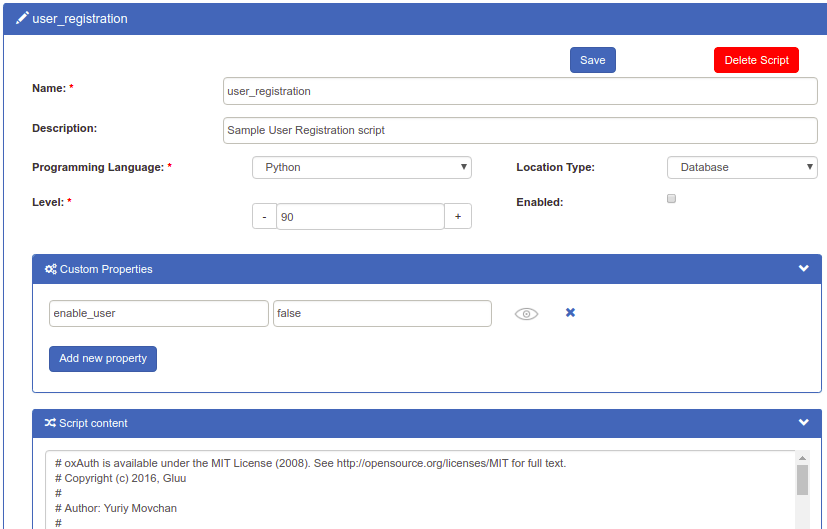
To add an email activation sequence, also enable the
user_confirm_registrationscript and configure SMTP.New users will now be able to register for accounts at:
https://<hostname>/identity/register.htm.
#Adding Attributes to Registration
A limited number of attributes are present in the default registration form. More attributes can be added as needed by following the doc for adding attributes.
#Manual Approval of New Users
By default, the Custom property (key/value) field will include the values: enable_user and true. This enables new users to sign in as soon as registration is complete. If new users should be manually reviewed and approved, set this value to false.

#Enforcing Unique Email Addresses
Administrators can choose whether all email addresses should be unique. By default, uniqueness is enforced. To turn email uniqueness off, make the below changes in oxTrust and the LDAP.
#oxTrust
- Log in to the Gluu Admin UI
- Navigate to
Configuration>JSON Configuration - Select the
oxTrust Configurationtab - Select the appropriate option in the
enforceEmailUniquenessfield - Save
#OpenDJ
- Log in to the Gluu container
- Run this command to list all plugins:
/opt/opendj/bin/dsconfig -h hostname -p 4444 -D "cn=directory manager" -w yourPassword -n list-plugins - To disable the email uniqueness plugin, run this command:
/opt/opendj/bin/dsconfig -h hostname -p 4444 -D "cn=directory manager" -w yourPassword -n set-plugin-prop --plugin-name "Unique mail address" --set enabled:false - If you want to re-enable the email uniqueness plugin, run this command:
/opt/opendj/bin/dsconfig -h hostname -p 4444 -D "cn=directory manager" -w yourPassword -n set-plugin-prop --plugin-name "Unique mail address" --set enabled:true - Restart the
opendjservice.
#Design customizations
To modify the look and feel of the registration page, follow the customization doc.