
SCIM API
Gluu Server Community Edition supports the System for Cross-domain Identity Management (SCIM) version 2.0 out of the box.
To enable SCIM open the oxTrust administration interface and navigate to Organization Configuration > System Configuration. Find SCIM Support and select Enabled.
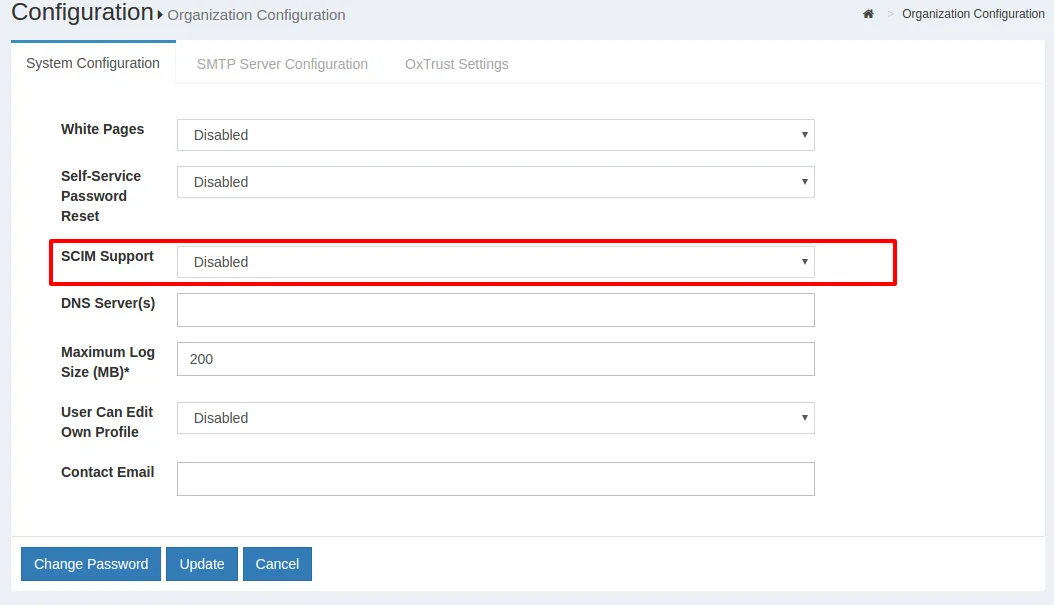
Then enable the protection mode you want for your API, see details here.
#Swagger Documentation
Current Swagger documentation for Gluu SCIM APIs can be found in the SCIM API Swagger document
#HTTP verbs
As a summary, these are the verbs a compliant SCIM server implementation (like Gluu) speaks:
| HTTP Method | Description |
|---|---|
| GET | Retrieves one or more resources (e.g. Users/Groups) |
| POST | Creates new resources, executes searches, send bulk requests (batches) |
| PUT | Modifies resources by adding and replacing attributes only |
| DELETE | Deletes a resource |
| PATCH | Modifies a resource using a client-provided specific set of changes (additions, removals, and updates) |
#Resource types
The following resources are supported:
| Resource | Schema URI | Notes |
|---|---|---|
| User | urn:ietf:params:scim:schemas:core:2.0:User | See section 4.1 of RFC 7643 |
| Group | urn:ietf:params:scim:schemas:core:2.0:Group | See section 4.2 of RFC 7643 |
| Fido u2f devices | urn:ietf:params:scim:schemas:core:2.0:FidoDevice | Represents a fido u2f credential enrolled by a user |
| Fido 2.0 devices | urn:ietf:params:scim:schemas:core:2.0:Fido2Device | Represents a fido 2.0 credential enrolled by a user |
Additionally the following resource extensions are defined:
| Resource | Schema URI | Attributes |
|---|---|---|
| User | urn:ietf:params:scim:schemas:extension:gluu:2.0:User | Attributes can be assigned dynamically via oxTrust |
In this section we provide a conformance matrix where you can see which features from the spec are supported by Gluu implementation.
To learn about the specific capabilities of the service, inspect your /ServiceProvider, /ResourceTypes, and /Schemas endpoints (see below). These endpoints are not protected so you can use a web browser to check.
#SCIM Endpoints
The following table summarizes the available endpoints in Gluu implementation of SCIM service
| Endpoint | Resource | HTTP methods | Description |
|---|---|---|---|
| /Users | User | GET, POST, PUT, DELETE | Retrieve, add, modify and delete Users |
| /Groups | Group | GET, POST, PUT, DELETE | Retrieve, add, modify and delete Groups |
| /FidoDevices | Fido devices | GET, PUT, DELETE | Retrieve, modify and delete Fido devices |
| /Bulk | POST | Applies operations of different kind to a set of resources | |
| /.search | POST | Search resources of all kind | |
| /ServiceProvider | GET | Retrieve service provider configuration | |
| /ResourceTypes | GET | Retrieve supported resource types | |
| /Schemas | GET | Retrieve supported schemas info |
SCIM 2.0 is governed by the SCIM:Core Schema and SCIM:Protocol spec docs. The latter contains full details about the API structure, so use it as a reference in your development tasks.
Important notes:
Unless otherwise stated, all endpoints are protected via UMA 2.0 or test mode.
All payloads sent to endpoints using POST or PUT should be supplied using Content-Type:
application/scim+jsonorapplication/json, and using UTF-8 encoding. Liwewise, output is sent from server in UTF-8.
#Conformance matrix
The following table lists characteristics of SCIM protocol (see section 3 of RFC 7644) and correlates the level of support and conformance provided by Gluu Server implementation.
| Characteristic | Compliance | Available via methods | Notes on support |
|---|---|---|---|
| Resource creation | Full | POST | Creation of Fido Devices not applicable |
| Resource retrieval by identifier | Full | GET | |
| Resource(s) retrieval by query | Full | GET and POST | Supports searches from root endpoint too. Complex multi-valued attributes not supported in sortBy param |
| Resource attributes replacement | Partial | PUT | To avoid clients to accidentally clear data, only attributes found in payload are modified. No need to pass the whole resource nor required attributes |
| Resource attributes modification | Full | PATCH | All types of operations supported (add/remove/replace) for user and group resources |
| Resource removal | Full | DELETE | |
| Bulk operations | Full | POST | Circular reference processing not supported. bulkIds can be used not only in "data" attribute of operations but in "path" too |
| Returned attributes control | Full | GET, POST, PUT, PATCH | Supports attributes/excludedAttributes params and attribute notation (sections 3.9/3.10) |
| "/me" URI alias | - | - | Not applicable: operations actually not executed on a user's behalf or other SCIM resource |
| Resource versioning | - | - | Feature may be available upon explicit customer demand |
#/identity/restv1/scim/v2/Users
#GET
Search users based on filter criteria (see section 3.4.2 of RFC 7644).
#Query parameters
| Name | Required | Data type |
|---|---|---|
| filter | no | string |
| startIndex | no | string |
| count | no | int |
| sortBy | no | string |
| sortOrder | no | string |
| attributes | no | string (comma-separated list) |
| excludedAttributes | no | string (comma-separated list) |
#Response
Output data is in form of a ListResponse. Resources returned belong to User.
Status code 200 is returned for a successful response.
#POST
Creates a user (see section 3.3 of RFC 7644).
#Parameters
| Name | Required | Located in | Data type |
|---|---|---|---|
| attributes | no | url | string (comma-separated list) |
| excludedAttributes | no | url | string (comma-separated list) |
| yes | body (payload) | Group |
#Response
The representation of the user created containing the attributes whose returnability is "default". This can be overriden by supplying attributes or excludedAttributes query parameters (see section 3.4.2.5 of RFC 7644).
Status code 201 is returned upon successful operation.
#/identity/restv1/scim/v2/Users/.search
Search groups based on filter criteria (see section 3.4.3 of RFC 7644).
#POST
#Parameters
| Name | Required | Data type |
|---|---|---|
| filter | no | string |
| startIndex | no | string |
| count | no | int |
| sortBy | no | string |
| sortOrder | no | string |
| attributes | no | string (comma-separated list) |
| excludedAttributes | no | string (comma-separated list) |
#Response
Output data is in form of a ListResponse. Resources returned belong to User.
Status code 200 is returned for a successful response.
#/identity/restv1/scim/v2/Users/{id}
#GET
Returns a user by id (see section 3.4.1 of RFC 7644).
#Parameters
| Name | Required | Located in | Data type |
|---|---|---|---|
| attributes | no | url | string (comma-separated list) |
| excludedAttributes | no | url | string (comma-separated list) |
#Response
The user requested containing the attributes whose returnability is "default". This can be overriden by supplying attributes or excludedAttributes query parameters (see section 3.4.2.5 of RFC 7644).
Status code 200 is returned upon successful operation. If the id supplied as part of the URL does not map to an existing user, then 404 is returned.
#PUT
Updates a user (see section 3.5.1 of RFC 7644).
#Parameters
| Name | Required | Located in | Data type |
|---|---|---|---|
| attributes | no | url | string (comma-separated list) |
| excludedAttributes | no | url | string (comma-separated list) |
| yes | body (payload) | User |
For payload data, it's not necessary to provide the whole User representation. Partial data suffices, that is, a Json object that contains the attributes to be replaced in the destination.
#Response
The representation of the user (after the update) containing the attributes whose returnability is "default". This can be overriden by supplying attributes or excludedAttributes query parameters (see section 3.4.2.5 of RFC 7644).
Status code 200 is returned upon successful operation. If the id supplied as part of the URL does not map to an existing user, then 404 is returned.
#PATCH
Modifies a user (see section 3.5.2 of RFC 7644).
#Parameters
| Name | Required | Located in | Data type |
|---|---|---|---|
| attributes | no | url | string (comma-separated list) |
| excludedAttributes | no | url | string (comma-separated list) |
| yes | body (payload) | PatchRequest |
#Response
The representation of the user (after modification) containing the attributes whose returnability is "default". This can be overriden by supplying attributes or excludedAttributes query parameters (see section 3.4.2.5 of RFC 7644).
Status code 200 is returned upon successful operation. If the id supplied as part of the URL does not map to an existing user, then 404 is returned.
#DELETE
Deletes a user (see section 3.6 of RFC 7644).
#Parameters
None
#Response
A no content response (status code 204) if the operation was a successful. If the id supplied as part of the URL does not map to an existing user, then 404 is returned.
#/identity/restv1/scim/v2/Groups
#GET
Search groups based on filter criteria (see section 3.4.2 of RFC 7644).
#Query parameters
| Name | Required | Data type |
|---|---|---|
| filter | no | string |
| startIndex | no | string |
| count | no | int |
| sortBy | no | string |
| sortOrder | no | string |
| attributes | no | string (comma-separated list) |
| excludedAttributes | no | string (comma-separated list) |
#Response
Output data is in form of a ListResponse. Resources returned belong to Group.
Status code 200 is returned for a successful response.
#POST
Creates a group (see section 3.3 of RFC 7644).
#Parameters
| Name | Required | Located in | Data type |
|---|---|---|---|
| attributes | no | url | string (comma-separated list) |
| excludedAttributes | no | url | string (comma-separated list) |
| yes | body (payload) | Group |
#Response
The representation of the group created containing the attributes whose returnability is "default". This can be overriden by supplying attributes or excludedAttributes query parameters (see section 3.4.2.5 of RFC 7644).
Status code 201 is returned upon successful operation.
#/identity/restv1/scim/v2/Groups/.search
Search groups based on filter criteria (see section 3.4.3 of RFC 7644).
#POST
#Parameters
| Name | Required | Data type |
|---|---|---|
| filter | no | string |
| startIndex | no | string |
| count | no | int |
| sortBy | no | string |
| sortOrder | no | string |
| attributes | no | string (comma-separated list) |
| excludedAttributes | no | string (comma-separated list) |
#Response
Output data is in form of a ListResponse. Resources returned belong to Group.
Status code 200 is returned for a successful response.
#/identity/restv1/scim/v2/Groups/{id}
#GET
Returns a group by id (see section 3.4.1 of RFC 7644).
#Parameters
| Name | Required | Located in | Data type |
|---|---|---|---|
| attributes | no | url | string (comma-separated list) |
| excludedAttributes | no | url | string (comma-separated list) |
#Response
The group requested containing the attributes whose returnability is "default". This can be overriden by supplying attributes or excludedAttributes query parameters (see section 3.4.2.5 of RFC 7644).
Status code 200 is returned upon successful operation. If the id supplied as part of the URL does not map to an existing group, then 404 is returned.
#PUT
Updates a group (see section 3.5.1 of RFC 7644).
#Parameters
| Name | Required | Located in | Data type |
|---|---|---|---|
| attributes | no | url | string (comma-separated list) |
| excludedAttributes | no | url | string (comma-separated list) |
| yes | body (payload) | Group |
For payload data, it's not necessary to provide the whole Group representation. Partial data suffices, that is, a Json object that contains the attributes to be replaced in the destination.
#Response
The representation of the group (after the update) containing the attributes whose returnability is "default". This can be overriden by supplying attributes or excludedAttributes query parameters (see section 3.4.2.5 of RFC 7644).
Status code 200 is returned upon successful operation. If the id supplied as part of the URL does not map to an existing group, then 404 is returned.
#PATCH
Modifies a group (see section 3.5.2 of RFC 7644).
#Parameters
| Name | Required | Located in | Data type |
|---|---|---|---|
| attributes | no | url | string (comma-separated list) |
| excludedAttributes | no | url | string (comma-separated list) |
| yes | body (payload) | PatchRequest |
#Response
The representation of the group (after modification) containing the attributes whose returnability is "default". This can be overriden by supplying attributes or excludedAttributes query parameters (see section 3.4.2.5 of RFC 7644).
Status code 200 is returned upon successful operation. If the id supplied as part of the URL does not map to an existing group, then 404 is returned.
#DELETE
Deletes a group (see section 3.6 of RFC 7644).
#Parameters
None
#Response
A no content response (status code 204) if the operation was a successful. If the id supplied as part of the URL does not map to an existing group, then 404 is returned.
#/identity/restv1/scim/v2/FidoDevices
#GET
Search fido devices based on filter criteria (see section 3.4.2 of RFC 7644).
#Query parameters
| Name | Required | Data type |
|---|---|---|
| filter | no | string |
| startIndex | no | string |
| count | no | int |
| sortBy | no | string |
| sortOrder | no | string |
| attributes | no | string (comma-separated list) |
| excludedAttributes | no | string (comma-separated list) |
#Response
Output data is in form of a ListResponse. Resources returned belong to FidoDevice.
Status code 200 is returned for a successful response.
#/identity/restv1/scim/v2/FidoDevices/.search
Search FIDO devices based on filter criteria (see section 3.4.3 of RFC 7644).
#POST
#Parameters
| Name | Required | Data type |
|---|---|---|
| filter | no | string |
| startIndex | no | string |
| count | no | int |
| sortBy | no | string |
| sortOrder | no | string |
| attributes | no | string (comma-separated list) |
| excludedAttributes | no | string (comma-separated list) |
#Response
Output data is in form of a ListResponse. Resources returned belong to FidoDevice.
Status code 200 is returned for a successful response.
#/identity/restv1/scim/v2/FidoDevices/{id}
#GET
Returns a fido u2f device by id (see section 3.4.1 of RFC 7644).
#Parameters
| Name | Required | Located in | Data type |
|---|---|---|---|
| attributes | no | url | string (comma-separated list) |
| excludedAttributes | no | url | string (comma-separated list) |
#Response
The FidoDevice requested containing the attributes whose returnability is "default". This can be overriden by supplying attributes or excludedAttributes query parameters (see section 3.4.2.5 of RFC 7644).
Status code 200 is returned upon successful operation. If the id supplied as part of the URL does not map to an existing fido u2f device, then 404 is returned.
#PUT
Updates a fido u2f device (see section 3.5.1 of RFC 7644).
#Parameters
| Name | Required | Located in | Data type |
|---|---|---|---|
| attributes | no | url | string (comma-separated list) |
| excludedAttributes | no | url | string (comma-separated list) |
| yes | body (payload) | FidoDevice |
For payload data, it's not necessary to provide the whole FidoDevice representation. Partial data suffices, that is, a Json object that contains the attributes to be replaced in the destination.
Take into account the mutability of attributes for this resource (check the /Schemas endpoint). For security reasons only a few attributes are allowed to be modified.
#Response
The representation of the FidoDevice (after the update) containing the attributes whose returnability is "default". This can be overriden by supplying attributes or excludedAttributes query parameters (see section 3.4.2.5 of RFC 7644).
Status code 200 is returned upon successful operation. If the id supplied as part of the URL does not map to an existing fido u2f device, then 404 is returned.
#DELETE
Deletes a fido u2f device (see section 3.6 of RFC 7644).
#Parameters
None
#Response
A no content response (status code 204) if the operation was a successful. If the id supplied as part of the URL does not map to an existing fido u2f device, then 404 is returned.
#/identity/restv1/scim/v2/Fido2Devices
#GET
Search fido 2.0 devices based on filter criteria (see section 3.4.2 of RFC 7644).
#Query parameters
| Name | Required | Data type |
|---|---|---|
| filter | no | string |
| startIndex | no | string |
| count | no | int |
| sortBy | no | string |
| sortOrder | no | string |
| attributes | no | string (comma-separated list) |
| excludedAttributes | no | string (comma-separated list) |
#Response
Output data is in form of a ListResponse. Resources returned belong to Fido2Device.
Status code 200 is returned for a successful response.
#/identity/restv1/scim/v2/Fido2Devices/.search
Search fido 2.0 devices based on filter criteria (see section 3.4.3 of RFC 7644).
#POST
#Parameters
| Name | Required | Data type |
|---|---|---|
| filter | no | string |
| startIndex | no | string |
| count | no | int |
| sortBy | no | string |
| sortOrder | no | string |
| attributes | no | string (comma-separated list) |
| excludedAttributes | no | string (comma-separated list) |
#Response
Output data is in form of a ListResponse. Resources returned belong to Fido2Device.
Status code 200 is returned for a successful response.
#/identity/restv1/scim/v2/Fido2Devices/{id}
#GET
Returns a fido 2.0 device by id (see section 3.4.1 of RFC 7644).
#Parameters
| Name | Required | Located in | Data type |
|---|---|---|---|
| attributes | no | url | string (comma-separated list) |
| excludedAttributes | no | url | string (comma-separated list) |
#Response
The Fido2Device requested containing the attributes whose returnability is "default". This can be overriden by supplying attributes or excludedAttributes query parameters (see section 3.4.2.5 of RFC 7644).
Status code 200 is returned upon successful operation. If the id supplied as part of the URL does not map to an existing fido 2 device, then 404 is returned.
#PUT
Updates a fido 2 device (see section 3.5.1 of RFC 7644).
#Parameters
| Name | Required | Located in | Data type |
|---|---|---|---|
| attributes | no | url | string (comma-separated list) |
| excludedAttributes | no | url | string (comma-separated list) |
| yes | body (payload) | Fido2Device |
For payload data, it's not necessary to provide the whole Fido2Device representation. Partial data suffices, that is, a Json object that contains the attributes to be replaced in the destination.
Take into account the mutability of attributes for this resource (check the /Schemas endpoint). For security reasons only a few attributes are allowed to be modified.
#Response
The representation of the Fido2Device (after the update) containing the attributes whose returnability is "default". This can be overriden by supplying attributes or excludedAttributes query parameters (see section 3.4.2.5 of RFC 7644).
Status code 200 is returned upon successful operation. If the id supplied as part of the URL does not map to an existing fido 2 device, then 404 is returned.
#DELETE
Deletes a fido 2 device (see section 3.6 of RFC 7644).
#Parameters
None
#Response
A no content response (status code 204) if the operation was a successful. If the id supplied as part of the URL does not map to an existing fido 2 device, then 404 is returned.
#/identity/restv1/scim/v2/Bulk
Applies bulk operations (see section 3.7 of RFC 7644).
#POST
#Parameters
| Name | Located in | Required | Data type |
|---|---|---|---|
| body (payload) | yes | BulkRequest |
#Response
A BulkResponse with details of every attempted operation. The shape and size of the response depends heavily on the value of "failOnErrors" found in BulkRequest (see spec).
Status code 200 is returned upon successful operation. Every operation result in BulkResponse contains at the same time its own status code.
#/identity/restv1/scim/v2/.search
Search resources based on filter criteria (see section 3.4.3 of RFC 7644).
#POST
#Parameters
| Name | Required | Data type |
|---|---|---|
| filter | no | string |
| startIndex | no | string |
| count | no | int |
| sortBy | no | string |
| sortOrder | no | string |
| attributes | no | string (comma-separated list) |
| excludedAttributes | no | string (comma-separated list) |
#Response
Output data is in form of a ListResponse. Resources returned belong to Resource.
Status code 200 is returned for a successful response.
#Service Provider Configuration Endpoints
There are three endpoints that facilitate discovery of features of the service itself and about the schema used; in other words, service metadata. Please check section 4 of RFC 7644 for more information.
#/identity/restv1/scim/v2/ServiceProvider
#Security
This endpoint is not protected
#GET
#Parameters
None (no query params).
#Response
Information about the capabilities of the server in Json format as decribed in section 5 of RFC 7643.
Status code 200 is returned for a successful response.
#/identity/restv1/scim/v2/ResourceTypes
#Security
This endpoint is not protected
#GET
#Parameters
None (no query params).
#Response
Information about the types of resources available in the service (e.g., Users and Groups) in form of a ListResponse.
It's possible to request the information for a single resource type by adding a resource name suffix to the URL, for instance /ResourceTypes/User for users. In this case, a json is returned according to section 6 of RFC 7643.
Status code 200 is returned for a successful response.
#/identity/restv1/scim/v2/Schemas
#Security
This endpoint is not protected
#GET
#Parameters
None (no query params).
#Response
Retrieves the schemas in use by available resources (and which are accepted by the service provider).
Output data is in form of a ListResponse, however it's possible to request the information for a single resource type by adding a schema URI suffix to the URL, for instance /Schemas/urn:ietf:params:scim:schemas:core:2.0:Group for schema info about groups. In this case, a json is returned according to section 7 of RFC 7643.
Status code 200 is returned for a successful response.
#Definitions
This section summarizes data model definitions useful to understand what values to supply when interacting with the different endpoints of the API. For more detailed information please:
- See SCIM:Core Schema
- Inspect the contents of the
/Schemasendpoint. Use a browser for this (none of the service provider configuration endpoints are protected).
#General
| name | type | required |
|---|---|---|
| created | string (date-time) | no |
| lastModified | string (date-time) | no |
| location | string | no |
| resourceType | string | no |
| name | type | required |
|---|---|---|
| schemas | array[string] | yes |
| totalResults | integer | no |
| startIndex | integer | no |
| itemsPerPage | integer | no |
| resources | array[Resource] | yes |
| name | type | required |
|---|---|---|
| schemas | array[string] | required |
| id | string | no |
| externalId | string | no |
| meta | Meta | no |
#Bulks
| name | type | required |
|---|---|---|
| schemas | array[string] | yes |
| failOnErrors | integer | no |
| operations | array[BulkOperation] | yes |
| name | type | required |
|---|---|---|
| schemas | array[string] | yes |
| operations | array[BulkOperation] | yes |
| name | type | required |
|---|---|---|
| bulkId | string | no |
| method | string | yes |
| path | string | no |
| location | string | no |
| data | object | no |
| status | string | no |
| response | object | no |
#Patches
| name | type | required |
|---|---|---|
| schemas | array[string] | yes |
| Operations | array[PatchOperation] | yes |
| name | type | required |
|---|---|---|
| op | string | yes |
| path | string | no |
| value | Object | no |
#Users-related
| name | type | required |
|---|---|---|
| schemas | array[string] | yes |
| meta | Meta | no |
| id | string | no |
| externalId | string | no |
| userName | string | no |
| name | Name | no |
| displayName | string | no |
| nickName | string | no |
| profileUrl | string | no |
| title | string | no |
| userType | string | no |
| preferredLanguage | string | no |
| locale | string | no |
| timezone | string | no |
| active | boolean | no |
| password | string | no |
| emails | array[Email] | no |
| phoneNumbers | array[PhoneNumber] | no |
| ims | array[Im] | no |
| photos | array[Photo] | no |
| addresses | array[Address] | no |
| entitlements | array[Entitlement] | no |
| roles | array[Role] | no |
| x509Certificates | array[X509Certificate] | no |
| groups | array[GroupRef] | no |
| name | type | required |
|---|---|---|
| formatted | string | no |
| familyName | string | no |
| givenName | string | no |
| middleName | string | no |
| honorificPrefix | string | no |
| honorificSuffix | string | no |
| name | type | required |
|---|---|---|
| primary | boolean | no |
| formatted | string | no |
| streetAddress | string | no |
| locality | string | no |
| region | string | no |
| postalCode | string | no |
| country | string | no |
| type | string | no |
| name | type | required |
|---|---|---|
| value | string | yes |
| display | string | no |
| primary | boolean | no |
| type | string | no |
| name | type | required |
|---|---|---|
| value | string | yes |
| display | string | no |
| primary | boolean | no |
| type | string | no |
| name | type | required |
|---|---|---|
| value | string | yes |
| display | string | no |
| primary | boolean | no |
| type | string | no |
| name | type | required |
|---|---|---|
| value | string | yes |
| display | string | no |
| primary | boolean | no |
| type | string | no |
| name | type | required |
|---|---|---|
| value | string | yes |
| display | string | no |
| primary | boolean | no |
| type | string | no |
| name | type | required |
|---|---|---|
| value | string | yes |
| display | string | no |
| primary | boolean | no |
| type | string | no |
| name | type | required |
|---|---|---|
| value | string | yes |
| display | string | no |
| primary | boolean | no |
| type | string | no |
| name | type | required |
|---|---|---|
| value | string | yes |
| display | string | no |
| type | string | no |
| $ref | string | no |
#Groups-related
| schemas | array[string] | yes |
| meta | Meta | no |
| id | string | no |
| externalId | string | no |
| name | type | required |
|---|---|---|
| displayName | string | no |
| members | array[MemberRef] | no |
| name | type | required |
|---|---|---|
| value | string | yes |
| display | string | no |
| type | string | no |
| $ref | string | no |
#Fido u2f devices-related
| name | type | required |
|---|---|---|
| schemas | array[string] | yes |
| meta | Meta | no |
| id | string | no |
| userId | string | no |
| creationDate | string (date-time) | no |
| application | string | no |
| counter | string | no |
| deviceData | string | no |
| deviceHashCode | string | no |
| deviceKeyHandle | string | no |
| deviceRegistrationConf | string | no |
| lastAccessTime | string (date-time) | no |
| status | string | no |
| displayName | string | no |
| description | string | no |
| nickname | string | no |
#Fido 2.0 devices-related
| name | type | required |
|---|---|---|
| schemas | array[string] | yes |
| meta | Meta | no |
| id | string | no |
| userId | string | no |
| creationDate | string (date-time) | no |
| counter | integer | no |
| status | string | no |
| displayName | string | no |