
User Claims
tags:
- user-claims
- administration
- admin-ui
- schema
- person
- attributes
User Claims are individual pieces of user data, like uid, email, firstName, etc., that are required by applications in order to identify a user. The Admin UI allows administrators to manage these user claims effectively.
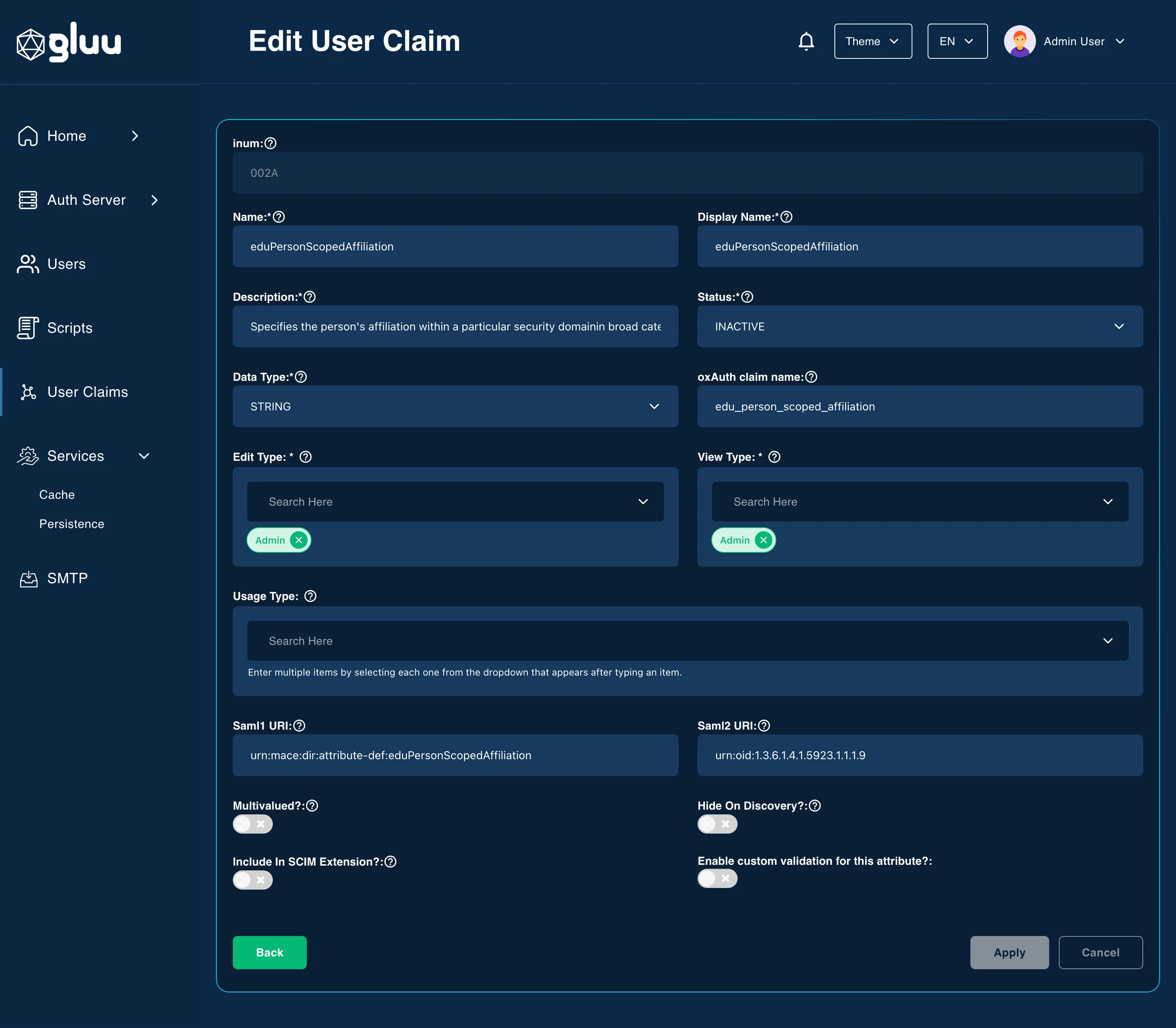
The following fields are supported in the Person (attribute) creation form:
Name
- This field defines the internal name of the attribute.
Display Name
- A human-readable label for the attribute.
Description
- A short textual description explaining what the attribute is or how it is used.
Status
- Allows you to enable or disable attributes without deleting them.
Data Type
- Defines the type of data the attribute holds. Common types include
string,boolean,numeric, etc.
- Defines the type of data the attribute holds. Common types include
Edit Type
- Specifies who has permission to edit this attribute — either
ADMINorUSER.
- Specifies who has permission to edit this attribute — either
View Type
- Specifies who can view this attribute in the UI —
ADMINorUSER, or both.
- Specifies who can view this attribute in the UI —
Usage Type
- Defines the use case for the attribute.
oxAuth Claim Name
- The name of the claim as it will appear in an OpenID Connect (OIDC) ID token or UserInfo response.
Multivalued?
- Boolean toggle to allow the attribute to store multiple values (e.g., a list of email addresses).
Hide On Discovery?
- Boolean setting that controls whether the attribute is shown on the
.well-known/openid-configurationdiscovery endpoint.
- Boolean setting that controls whether the attribute is shown on the
Include In SCIM Extension?
- Boolean flag indicating whether the attribute should be part of the SCIM schema extension.
- Used to extend the SCIM (System for Cross-domain Identity Management) schema with custom attributes.
Enable Custom Validation for This Attribute?
- Toggle to activate custom validation rules like minimum/maximum length and regex.
- Helps enforce stricter formatting or content rules for this attribute. Must be enabled to use regex, min, or max length fields.
Regular expression:
- You can set a regex pattern to enforce the proper formatting of an attribute. For example, you could set a regex expression for an email attribute like this:
^[A-Z0-9._%+-]+@[A-Z0-9.-]+\\.[A-Z]{2,6}$. - This would make sure that a value is added for the attribute only if it follows standard email formatting.
Minimum length:
- This is the minimum length of a value associated with this attribute.
Maximum length:
- This is the maximum length of a value associated with this attribute.
Saml1 URI
- Defines a URI for this attribute that is compatible with SAML 1.1 standards.
Saml2 URI
- Defines a URI for this attribute that is compatible with SAML 2.0 standards.